Community Builder Advanced Search: Search By Age Interval and Avatar Only Unofficial Hack

As I posted in joomla forum about my plan to release my hack for community builder advanced search, here I will give some notes about how to enable and implement the hack. This hack is made for Community Builder Advanced Search 2.0.4 (which might be later adapted to work with the upcoming 2.0.5).

Before you proceed

Currently this component only works in Joomla 1.0.x. It’s not recommended to install this component on Joomla 1.5 unless you want to provide assistance in reporting bugs and compatibility of this component. Please read the full article here.

What’s this hack for?

This hack will enable search for members with certain age ranges, defined by user. This hack will also add extra filter to show only member with avatar / thumbnail photo.

Who will benefit from this hack?

Community based site’s owners and webmasters who use Community Builder to power their community-based service.

Short notice before you decide to implement this hack:

This hack is intended to work with simple_menu_2 mode. If you use other modes for the search, the search won’t take any effect from this modification.

About simple_menu_2 mode:

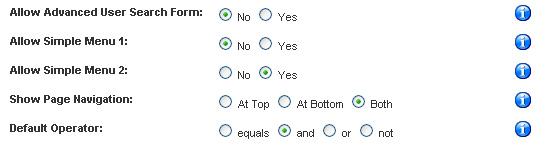
This mode is the one where you can put several search criteria (ie. predetermined fields). and filter the search based on user input to each field. To check if this mode is enabled, go to Components > Community Builder Advanced Search > Configuration and make sure “Allow Simple Menu 2″ is set to “Yes”.

Simple Menu 2 Enabled

To enable this hack, please follow the instruction given below:

1. Download the modified component from this link: http://dev.amikelive.com/joomla1/component/ option,com_remository/Itemid,5/func,fileinfo/id,2/

2. Install the component using Joomla installer from admin backend

3. From your admin panel, go to Components > Community Builder Advanced Search > Configuration

4 Scroll down. Two new config sections will appear.
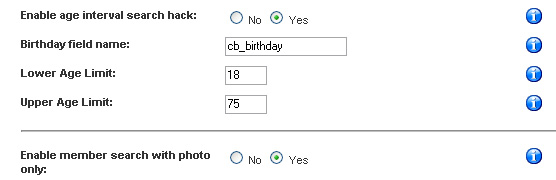
New Config

The first one is config directive for search by age interval. Enable this hack and manage the interval. For the birthday field, you need to first create the field through Community Builder and make sure your new user is forced to fill his/her birtday or s/he won’t be appeared on the search result page.

For the avatar only directive, no more configuration is needed. Enabling this hack is enough.

If you follow the steps properly, your search form will now be added with two new fields: the search by age interval and search by avatar/photo only.
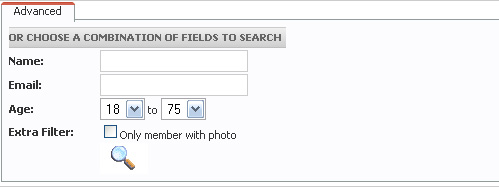
Search Form

Updates as of 08/14/2007:

  1. Extra sql string to check if avatar contains nophoto.jpg
  2. Tiny cosmetic change in the search template
  3. Sql error fix if “avatar only search” is enabled and user only checks that option and leaves other search criteria (if any) empty.

Updates as of 12/17/2007:

  • Comment is now closed. Please refer to new post “Community Builder Advanced Search (Modified Version) Bugtrack and Wishlist” if you want to submit bug or request new features
  • What to provide for a bug report:
    • Current Joomla version
    • Current Community Builder version
    • Steps to replicate bug in details (#R)
    • Online sample if I can not reproduce #R
  • What to provide for a feature request:
    • Reason for the request
    • Who will take benefit from this additional feature
    • Request details

Update as of 01/08/2008:

  • Comment section reopened after considering some requests and inputs.

Please help me by providing input if you want to make this hack better.

65 Responses to “Community Builder Advanced Search: Search By Age Interval and Avatar Only Unofficial Hack”


  1. 1 dartagnan32 UNITED STATES Jun 10th, 2007 at 11:07 am

    Great work Mike!
    Ir works perfectly with my website. Just what this com cb advanced search needed! Age by search and profiles with avatar.
    When do you add search within a certain distance of a city? hehe Just joking I guess this is pretty hard unless you add a thirdparty code…
    Anyway for everybody using CB this it the definitive modified component to add to your website!

  2. 2 joomla GERMANY Jun 11th, 2007 at 8:32 am

    Hey, your component doesn´t work for me…it gives a mysql error when it do something with it…Please reply by mail…Thank you

  3. 3 Tech Admin INDONESIA Jun 11th, 2007 at 9:30 am

    @dartagnan32
    thanks.. search based on distance will need third party data (ie. zip code, latitude, and longitude) thus this can’t be implemented in the GPL’ed component unless the data is also GPL

    @joomla
    could you please put the error message here? some people might face the same error. listing it here will probably help others too.

  4. 4 joomla1234 GERMANY Jun 14th, 2007 at 3:16 pm

    When i try to konfigure your component i get this: _CB_AS_ERR_BAD_INTERVAL

    When i try to select a field i get this: You have an error in your SQL syntax; check the manual that corresponds to your MySQL server version for the right syntax to use near? at line 2 SQL= UPDATE jos_cb_search_fields SET search=1 WHERE id IN()

  5. 5 Tech Admin INDONESIA Jun 14th, 2007 at 5:58 pm

    hi,
    the _CB_AS_ERR_BAD_INTERVAL is displayed if you enter invalid age interval for the search. Please make sure the range is common sense like 16 to 85 or such (not vice versa).

    The mysql error you get is something outside of my modification. It’s probably a bug from the original component. Please send me an email with full steps to replicate the problem so that i can take a look and fix the problem.

  6. 6 joomla1234 GERMANY Jun 15th, 2007 at 4:02 am

    I dont know your E-Mail… my e-mail is: jooml***[removed]yahoo.de . Please send me an e-mail i would like to reply as soon as possible…

  7. 7 dawn UNITED STATES Jun 15th, 2007 at 12:29 pm

    Help - why doesn’t the advanced search work for me???? It’s returning zero results for every search even when i know there should be results for that search…

    I left a bunch of comments in the emptorum.com site but nobody seems to be watching that site.

    Is there a way to just show the simple search and not the advanced tab until we figure this issue out?

    Any help would be greatly appreciated! Thanks!!!

  8. 8 Mike SWEDEN Jun 23rd, 2007 at 1:54 pm

    When i use your hack it seems that when a member search for exampele “Female with photo” It only show 10 female but the female members are 25 members?
    How come? All the photo is jpg??So it should show 25 pictures

    /Mike

  9. 9 Tech Admin INDONESIA Jun 26th, 2007 at 8:24 am

    @Mike
    hi,
    this is old issue with paging. afaik, i have resolved this in the release. please let me know if you still face this issue.

  10. 10 Mike SWEDEN Aug 10th, 2007 at 7:58 am

    Hi again.

    I use your mod.2.0.4

    It show all pictures and also the avatars like nophoto.jpg.
    I asume that its the jpg file it reads and think its a real photo.

    How to not include the nophoto.jpg avatars?

    Mike

    Best if you mailme direct so i can see when you answer.

    /Mike

  11. 11 Dumitru REPUBLIC OF MOLDOVA Aug 12th, 2007 at 2:51 pm

    Hi there! Thank you for a great CB plugin … But still, I would appreciate if you’d tell me how to fix the thing with avatars. By selecting “” It shows all users even the one with no avatar …

    Regards,
    Dumitru

  12. 12 Tech Admin INDONESIA Aug 14th, 2007 at 4:14 am

    @Dumitru and Mike
    I can not reproduce the bug you mentioned. Please contact me at mike at amikelive dot com if you still face the problem and want to get more detailed response

    In the meantime, I’ve updated the component. Enjoy

  13. 13 minghowe SINGAPORE Aug 22nd, 2007 at 10:51 pm

    Hi, i have installed the CB Advanced Search component from the above link,

    hxxp://dev.amikelive.com/joomla1/downloads/cb_search_2.0.4_mod.zip (change xx with tt)

    Upon installation, i have set “Allow Simple Menu 2″ in the config, but i still does not allow me to search by age using the hack. I also could not allow user to search by name even though i have enable “name” in the search field.

    Anybody can help me with that?

  14. 14 jlsaloff UNITED STATES Aug 30th, 2007 at 2:27 pm

    In regard to the user who had the error, I had this happen too, but had forgotten to follow the instructions inside the Advanced User Configuration which said to “click update search fields first.” Once I did that, the error message stopped.

    I need help in another means. The original Advanced Search website is apparently down. Thus the only component I got was this one. I have no options with my ASC - just the main config page and options that are available from it. Do I also need the original module that went along with the original component in order for this work? If I need the original module, can someone tell me an alternative site from where to download it or perhaps email it to me?

    Also, I have no instructions. What do I need to do to create a page with the search box on it? This type of search was exactly what I have been looking for, so I hope I can get it to work. I can see all the fields etc., but don’t know how to get the search box.

    BTW, I can find none of the info seems to say which version of Joomla this is for. I am using 1.0.8.

    JLS

  15. 15 jlsaloff UNITED STATES Aug 30th, 2007 at 6:15 pm

    Okay, here’s an update!

    I found the help menu located in the menu choices with the Advanced Search component. (duh). From there, I learned how to connect the search to the menu.

    I still need to know how to create a 3-column avatar only list. (Is that possible?) And if I have that list, does that disable my other user list?

    Also, I still need to know if I need the mambot.

    Thanks,

    JLS

  16. 16 chiground UNITED STATES Sep 5th, 2007 at 3:02 pm

    Hi, I installed the com but how do i get it to display in my user menu?

  17. 17 Victor ISRAEL Sep 14th, 2007 at 11:00 am

    Hi,

    What kind of field do I need to create on order to search by Age interval ?

    I have tried to add “Date” field, so I asked for birthday date, but when I try searching I get this error:

    Parse error: syntax error, unexpected ‘,’, expecting T_STRING or T_VARIABLE or ‘{’ or ‘$’ in /home/xxxxxx/public_html/xxxxxxx/components/com_cb_search/cb_search.html.php(504) : eval()’d code on line 3

    Please help.

  18. 18 Tech Admin REPUBLIC OF KOREA Sep 16th, 2007 at 8:56 am

    Hi Victor,
    Currently I can not reproduce your bug because I’m still at the phase of restoring data from my storage device. I’ll check this problem later and when I confirm this bug, a patch will be provided and can be downloaded at the aforementioned url.

  19. 19 Victor ISRAEL Sep 20th, 2007 at 5:18 pm

    Hi Tech Admin,

    Thank you for your support. It is very important and useful hack.
    I will check it again and try to find more information.

    By the way, do you think to improve your hack by add an extra filter to show only online member ?

    Regards.

  20. 20 jak UNITED STATES Oct 1st, 2007 at 1:05 pm

    Two issues I’m having (otherwise it’s working great):

    1. I am having problems with dropdown selector fields. It seems there are certain values in each field that fail when selected (giving me a blank page after I press search). Other values in the same fields work perfectly fine and, inspecting the html, I can’t see anything wrong. For example, I have Male or Female as value choices on a gender dropdown select, if I select Female, it always fails.

    2. Selecting only members with photos fails with the same blank page.

    So, the age range selector is working great. FYI- I had the original advanced search com installed and tested successfully on all fields prior to reinstalling with the mod.

  21. 21 Flo GERMANY Oct 5th, 2007 at 2:43 am

    hi there,

    I installed the component but the result of the search for an age interval is always “0″, changing the values in the drop down fields for age does not seem to have any effect. It seems as if the age hack is not activated although I activated it in the configuration.

    Is this possibly because I am using german language and changed the format for “date” in the joomla configuration?

    Thanks for your help!
    Flo

  22. 22 Victor ISRAEL Oct 5th, 2007 at 5:32 pm

    Flo, use cb_birthday field not drop down.

  23. 23 Andy UNITED KINGDOM Oct 8th, 2007 at 7:40 pm

    I am getting massive error messages about the sql syntax to do with the dates, I am also getting a message saying windows does not support dates before January 1st 1970.

    whats going on?

  24. 24 Rayen UNITED STATES Oct 9th, 2007 at 2:21 pm

    @Andy,
    Did you try to work with CB 1.1 ?

  25. 25 Andy UNITED KINGDOM Oct 9th, 2007 at 3:37 pm

    Yes I did, Does this cause a problem?

  26. 26 Rayen UNITED STATES Oct 9th, 2007 at 5:20 pm

    @Andy,

    NO. This Hack working great with CB 1.1. Check carefully your cb_birthday configuration.

  27. 27 andy91 UNITED KINGDOM Oct 9th, 2007 at 6:40 pm

    As far as I can tell Iv followed the cb_birthday instructions correctly. I seem to be getting major errors. I even went as far deleteing the original birthday field and doing it again. The error messages changed. Can I contact you away from this? Or how can I contact the owner of this site.

    I have a picture of the error message Im getting here:
    http://www.joomlapolis.com/component/option,com_joomlaboard/Itemid,38/func,view/catid,40/id,47486/

    Im at a loss as it seems to be working for everybody else apart from me!

  28. 28 andy92 UNITED KINGDOM Oct 9th, 2007 at 7:25 pm

    Please goto my test site at http://www.fit-physiques.com and click on browse in the left menu. Put anything in the advanced search tab and you will see the error im taking about.

  29. 29 Rayen UNITED STATES Oct 10th, 2007 at 4:47 am

    I think You have problem with Avatar search field.
    Try it on a clean CB/Joomla installation. I don’t know why this happen.

  30. 30 andy99 UNITED KINGDOM Oct 10th, 2007 at 7:46 am

    Its happening on every installation I try it on. That site was the last place I tried to install it. There are even more errors on my local JSAS site. Perhaps he has made some changes to the code since you downloaded it? Could you email me the version you are using from your local machine or server to andy@fitphysiques.net?

  31. 31 Webmaster PT PORTUGAL Oct 19th, 2007 at 5:21 am

    I had the old hack and was working , in the beginnig this one was giving a error but i managed by the replys writen here .
    Now my problem is the component dont give any results ?!?!??!?
    why ?
    i don´t know :( Please i need help Urg !!!
    the website is loveknocks.com , in the left in the menu with the name
    PESQUISAR
    Please help me !!! i need this module very urgent i need for start lanch the website !
    sorry about the typos , i´m portuguese
    thanks in advance
    nunomfsilva @ netcabo.pt

  32. 32 Paul Carpentier CANADA Oct 19th, 2007 at 9:34 am

    Hello, Is there a version of CB Advance search with joomla 1.5 and CB 1.1 because i get a pattemplate error. If not, is there a workaround. Thank you .

  33. 33 andy ITALY Oct 22nd, 2007 at 3:54 am

    When I make any search I get the message: you are not allowed to view this page, as if I were an unregistered user.
    Is there anybody facing the same problem?

  34. 34 K3 GUYANA Nov 3rd, 2007 at 12:02 pm

    Hi, I’m lost here. Where can I find the advance search component or module for Joomla/CB? I installed CB and want my users to search by criteria of last name, first name, age, and maybe some other active fields in the modified CB registrations!
    Please help!

  35. 35 Tech Admin REPUBLIC OF KOREA Nov 3rd, 2007 at 11:07 pm

    @Paul
    This component should work with CB 1.1 installed in Joomla 1.0.13 or Joomla 1.5 with legacy mode enabled.

    @K3
    You can download this component from my dev site. Please check the link in my post.
    The search you want to perform is basically provided by the native component. You just need to set up which field to be searchable.

    @all
    I’ve set up a post for bugtrack and wishlist. Feel free to post bugs found and wishlist there. I’ll also verify and resolve bugs reported in this post.

  36. 36 PKL NORWAY Nov 12th, 2007 at 6:49 am

    Hi

    I have installed the component

    But, when i try to seek up myselfes i dont get any search results

    I have set the search feilds and are using advanced search

    Look like it dont find any users when seeikng

    Can you help me?

  37. 37 I Am N0t Sm4Rt UNITED STATES Nov 17th, 2007 at 9:02 pm

    I have a problem, lol

    Everything is going good except that I cant search anything. Let say I type in a user name and all it says is “There are no published user list” How do I change this?

  38. 38 hamed ISLAMIC REPUBLIC OF IRAN Dec 3rd, 2007 at 10:36 am

    tanks

  39. 39 Ian Morehead CANADA Dec 6th, 2007 at 1:09 pm

    I am also having the error of “No published user lists” popping up. Any thoughts? Would love to have this search function as well…excellent addon!

  40. 40 ibexy UNITED KINGDOM Jan 20th, 2008 at 7:56 pm

    Am getting errors. The component reports that item has been found but displays errors:

    Parse error: syntax error, unexpected ‘,’, expecting T_STRING or T_VARIABLE or ‘{’ or ‘$’ in /home/albert/public_html/octoclickcom/components/com_cb_search/cb_search.html.php(469) : eval()’d code on line 10

  41. 41 Roni UNITED STATES Feb 15th, 2008 at 2:45 pm

    The link to download ‘hack’ for advanced search is down. I see this error:
    Fatal error - we should have had a valid file ID

    Is it stored in any other directory?

  42. 42 Tech Admin REPUBLIC OF KOREA Feb 19th, 2008 at 12:12 am

    @Roni
    The link has been corrected. Thanks.

  43. 43 fungkur GERMANY Feb 26th, 2008 at 5:15 pm

    the component works great! the only problem i have, the pagination from the result is not working!

  44. 44 Extery RUSSIAN FEDERATION Feb 27th, 2008 at 3:24 am

    I have such a problem as joomla1234.
    you have an error in your SQL syntax, check the manual that corresponds to your MySQL server version for the right syntax to use near ‘)’ at line 2 = SQL UPDATE jos_cb_search_fields SET search = 1 WHERE id IN ()
    Found a solution to this problem?

  45. 45 roy NETHERLANDS Mar 14th, 2008 at 2:43 pm

    i got the same error as paul.

    quote:
    “Hello, Is there a version of CB Advance search with joomla 1.5 and CB 1.1 because i get a pattemplate error. If not, is there a workaround. Thank you”

    I run joomla 1.5.1 in legacy mode with cb 1.1

  46. 46 Arnol THAILAND Mar 16th, 2008 at 3:43 pm

    Doesn’t upload with 1015 joomla version. CB setup xml file not found
    Any solutions???

    Thanks

  47. 47 dipen UNITED STATES Mar 16th, 2008 at 11:26 pm

    all the things work fine. But when i search the member it gives the certain number of user and it does not the searched user. it only says: Records found with your search criteria:……
    But doesnot list the user. how can i fix that problem. any one help me.

  48. 48 grafika ARGENTINA Mar 20th, 2008 at 12:28 pm

    i installing advance searche with hak by age searche form and have problem: do not can searche any person with age 1969 and old age
    please help me!

  49. 49 Chenelle UNITED STATES Mar 21st, 2008 at 10:15 pm

    Same as another person when I try to select a field:

    Joomla 1.015, CB 1.1 : what I’m using

    You have an error in your SQL syntax; check the manual that corresponds to your MySQL server version for the right syntax to use near? at line 2 SQL= UPDATE jos_cb_search_fields SET search=1 WHERE id IN()

  50. 50 Tech Admin REPUBLIC OF KOREA Mar 27th, 2008 at 11:49 pm

    @fungkur
    i’ll recheck the pagination issue.

    @grafika
    yes, i know this problem. i should have this component updated and be compatible with cb 1.1 (which by default supports time less than UNIX timestamp initial date: January 1st, 1970)

    @others
    i’m still working on this component and will provide newer version which is compatible with joomla 1.5 and cb 1.1. as i said, time was an issue and i need to re-allocate time for working on open source projects.

  51. 51 rafa nog BRAZIL Apr 3rd, 2008 at 12:56 pm

    I have installed in Joomla 1.0.15 and cb 1.1 Everything is fine except the search always return “There are no published user list”

    Any ideas?

    Thanks

  52. 52 andy UNITED KINGDOM Apr 9th, 2008 at 8:08 pm

    How would I achieve something like the search page on this site:

    http://www.lookforplayers.com/index.php?option=com_cb_search&Itemid=51

    Its the cb advanced search component but they have styled it very well!

    Would I have to hack the core files and add classes to do this?

    The java script tabs would need to be taken out altogether!

    Im gonna give it ago any advice is welcome.

  53. 53 Tech Admin REPUBLIC OF KOREA Apr 13th, 2008 at 3:48 am

    @rafa nog
    I haven’t checked Joomla 1.0.15 yet. Currently, the existing file is a bit obsolete. I will notify if I have provided a newer version which is compatible to latest Joomla and CB versions.

    @andy
    Based on my observation, the modification is done to the template form, class file, and the frontend php file.

  54. 54 andy UNITED KINGDOM Apr 13th, 2008 at 1:30 pm

    It would be good if something like that could be implemented in your version.

    Iv also read that the standard version has problems when used on large sites with thousands of users. Surly that makes the component pretty worthless as it needs to be much more scalable.

  55. 55 Tech Admin REPUBLIC OF KOREA Apr 16th, 2008 at 11:43 pm

    @andy
    Yes, scalability issue is also another problem. As you might notice, I *might* decide a total rewrite of this component if my spare time permits.

    Thank you for your comment

  56. 56 andy UNITED KINGDOM Apr 17th, 2008 at 7:02 am

    Well I hope you do rewrite the whole component. The original authors site is dead and there does not look like there are any updates coming! If you do rewrite the component I and many others would be more than willing to pay reasonable amount for it!

  57. 57 andy UNITED KINGDOM May 4th, 2008 at 8:00 pm

    Hey my site is finally online with the advanced search working! Check it out http://www.joomlaplazza.com

  58. 58 grafika ARGENTINA May 23rd, 2008 at 5:53 am

    How time wait for new version? Thanks

  59. 59 Lisa UNITED KINGDOM Jun 9th, 2008 at 5:00 pm

    Hi the component works for me but I get a message after every query saying handler could not be removed - any suggestions on resolving this

  60. 60 Moni UNITED STATES Jun 14th, 2008 at 5:04 pm

    If your search returns no results, go into your CB list manager. Create a new list that contains ALL the members of your site. Make it the ‘default’ list. Now, you’ll get results.

    Moni
    theGrindLab.com

  61. 61 admin SPAIN Aug 10th, 2008 at 4:17 pm

    Hi,
    i have installed this version (after many problems on cbas 2.0.5 beta and 2.04).
    Congratulations, it seems to integrate many useful bug fixes.
    My problem is that when i launch a search, it returns the following messages :

    “Warning: Division by zero in /home/mydomain/administrator/components/com_cb_search/cb_search.class.php on line 778″

    “Warning: Division by zero in /home/mydomain/administrator/components/com_cb_search/cb_search.class.php on line 779″

    It seems to be due to $limit variable (equals 0 ?) …
    Any solution about that ?
    Thank you in advance

    dgo

    By the way, here is my conf :
    joomla 1.5
    cb 1.1
    cbas verison from today download : 10-aug-08

    cheers

  62. 62 andy UNITED KINGDOM Aug 18th, 2008 at 7:06 pm

    Any update on this? I’m waiting with bated breath LOL.

    The knew cb1.2rc has searchable userlists but its still crap. I don’t understand why they don’t just build a component like this into CB and be done with it!

  63. 63 Johny MALAYSIA Sep 2nd, 2008 at 9:50 am

    Hi.
    In my CB, it looks like a great solution to provide an advanced search of users.
    But the problem is I couldn’t run it at my site at all.
    Installation was successful, but when I click on Community Builder Advanced Search submenu of Components menu, it rather shows me error message below instead of any configuration window or something.

    Warning: cb_as::require_once(C:\AppServ\www\joomla/includes/patTemplate/patTemplate.php) [function.cb-as-require-once]: failed to open stream: No such file or directory in C:\AppServ\www\joomla\administrator\components\com_cb_search\cb_search.class.php on line 316

    Fatal error: cb_as::require_once() [function.require]: Failed opening required ‘C:\AppServ\www\joomla/includes/patTemplate/patTemplate.php’ (include_path=’.;C:\AppServ\php5;’) in C:\AppServ\www\joomla\administrator\components\com_cb_search\cb_search.class.php on line 316

    It’s an urgent problem, and I hope it will be solve ASAP.
    It happened on Joomla 1.5.5 with legacy mode turned on.
    The version information of this module I tried is 2.0.4

    Please Help.
    I want an answer in 12 hours.

    Best Regards.

  64. 64 Tech Admin REPUBLIC OF KOREA Sep 9th, 2008 at 5:48 am

    @andy
    sorry for waiting but at current state i can’t guarantee a release date. in fact i’m searching for another fellow developer to build the component from scratch with better conceptual dataflow instead of hackish way like current release. i also have other research stuff, so time is a constraint for me.

    @johny
    so sorry to mention that this release shouldn’t be used in pair with joomla 1.5.x

  65. 65 apollonios GREECE Nov 9th, 2008 at 3:07 pm

    The component works great! I have problem with pagination on results, is not working!

Leave a Reply


Worth Trying

Subscribe to RSS

  • Subscribe via Feed Burner