Comprehensive Guide to Java (JRE and JDK) Installation on Fedora Linux – Tips and Tricks

Sun's Java JRE and JDK on FedoraIn this article, you will be exposed to the installation of Sun Java in Fedora Linux. Although Java has been installed by default in every fresh Fedora package, the Java version shipped along with the OS package is the open-source version GNU Java instead. Some applications and frameworks may require Sun Java. Due to licensing issues, however, Sun Java can not be bundled with the default Fedora Linux package and should be installed separately. Although the installation steps in this article can also be reproducible in other Linux distributions, there is no guarantee that steps advised in this article will also work for other Linux distributions.

The installation of Sun Java in a Fedora Linux box can be seamlessly easy. Yet, some people especially those with minimum technical experience on *NIX OSes may face difficulties in completing the installation. This article tries to provide a comprehensive guide for the installation. It provides whole steps to be followed along with corresponding snapshots so that one can accomplish the installation successfully. It also shares some useful tips which may help readers in understanding the environment they are working on better.

Prerequisites and constraints

This installation assumes that the following requirements and constraints have been fulfilled:
1.    Installation will be conducted through the console prompt.
2.    User conducts the installation using root account.
3.    The software yum must have been already installed in the box.
4.    The software wget is already installed in the box.
Tip: if wget is not installed yet, run command yum install wget from the console and the software will be immediately installed.
5.    Fedora version used is Fedora 8.0 or newer.
Note: in legacy Fedora, there is different path in installing the compatibility libraries. You can check jpackage site for more information.
6.    JRE and JDK version to install is 1.6 (snapshots are for JRE and JDK 1.6 update 17)
Continue reading

Whitepaper – An Introduction to Private Cloud

As the word “cloud computing” becomes more ubiquitous these days, several questions can be raised ranging from basic question like the definitions of a cloud and cloud computing to more tempting questions like architecture of cloud infrastructure and implementation of cloud computing to solve complex, data-intensive compute problems.

Concerns raised over the cloud computing are mainly related on how secure and reliable the cloud is to support enterprise-level requirements. The notion of offloading data and process to third party infrastructure or software providers in cloud computing may not be a sound idea in the enterprise realm. This article will briefly summarize private cloud, a type of cloud environment which is designed to be run with stringent requirements that may fit the enterprise-level SLAs.

Download the full article here: An Introduction to Private Cloud (172129 downloads )

A Perspective of Failure

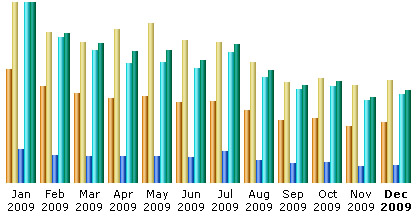
As the time is ticking and counting down to the new year, I’d like to review what I have done so far on this blog; my plan, my expectation compared with the realization and final result. Earlier in this year, I set a target, which I was pretty sure achievable. I aimed to increase the rank of the blog gradually by executing some methods I believed will end as success. However, the statistics of this blog for this year shows something that is perfectly contrary to my initial plan.

Statistics of tech.amikelive.com in 2009

It can be seen in the statistical graph that the traffic trend for this blog is negative. Traffic constantly decreased as the months progressed. In a bigger picture, it is clearly a sign of failure, a situation that is most unexpected by me. However, since it is there for a reason, learning and analyzing the cause and trying to improve the situation becomes interesting to me.

I have learned some lessons regarding to this failure. First, time is always a constraint. Even though I read a lot about new technologies, fiddled a lot with codes, explored a lot of new stuff, created some software, and did other things which should have turned into blog posts, in reality I couldn’t do so. This exacerbated the scarcity of good quality posts. The main cause of why I couldn’t sit on my couch writing interesting stories about my experiences is because I lacked the quality time to do so. Second, inspiration to write does not come instantly. Currently I have a list of post to write. But surprisingly, even though I created the list several months ago, it hasn’t been transformed into posts. Now, I perfectly understand the meaning of “writings deserve due appreciation”. Writing quality posts is apparently not easy. Third, managing too many things will sacrifice one or two things in the list. This is related with the first two lessons. Despite being successful in my other aspects of life, I failed to do it here. Finally, perfection sometimes brings trouble to advance to the next step. In the execution my plan, I often accentuate in perfection by ensuring the riddance of any sort of flaw which often hindered me from accomplishing the whole piece.

Slightly off topic, this year the economy was bouncing up again after the deceleration during the downturn. Good treatment and policy has progressively healed the wounded economy. I believe, I can also find the formula for treatment and apply it in order to go back on the track and level up this blog next year.

I welcome 2010 with optimism.

Green Purchasing Meets Green IT

I was attending a conference about green purchasing in fourth week of October taking place in Suwon, South Korea and pondering about what the substance of the conference would bring impact to the IT field. The conference theme was about green purchasing, a term coined to refer to purchasing of sustainable products. Despite the seemingly simplistic definition, the idea of the green purchasing actually has been attracting wider audience as these days concern about life sustainability on planet earth has been growing more rapidly.

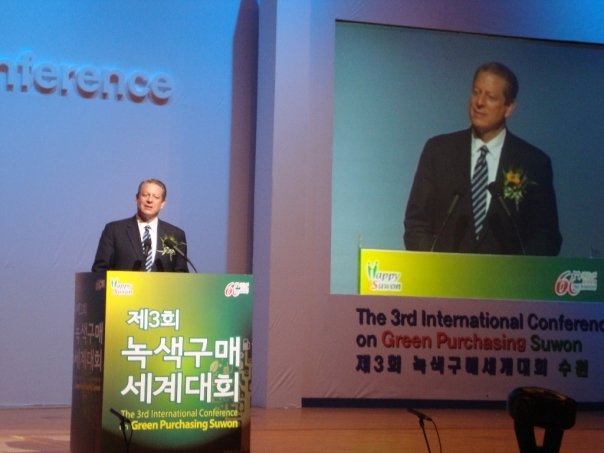
Al Gore's speech in 3rd Conference of Green PurchasingThe conference was organized by International Green Purchasing Network (IGPN), an organization which promotes green purchasing across the globe. It was sponsored mainly by the Korean government and some UN committees. Former US president Al Gore who was awarded as Nobel peace prize laureate in 2007 was invited to deliver the keynote speech. He spoke about the importance of living green to sustain the environment and do our work in ensuring that future generation would still be able to live on earth conveniently. He mentioned that climate change is a real issue and should be addressed through fast-paced global collaborations. The temperature rise issue, melting arctic ice issue, and some other environmental severance issues are wake-up calls to governments, companies, and also to individual consumers to take care more the behavior in living. Therefore, purchasing goods through green purchasing method is one of the methods an individual, company, or organization can contribute.
Continue reading

Sizzling Upload Progress Bar in PHP with APC, Part 1: APC Installation

After some series of “political” technical notes, I think it’s the right moment to supply some more technical posts to fellow developers. This time I will write about creating sizzling upload progress bar in PHP. In the past, there had been heated debate in PHP internal list about RFC 1867 implementation on PHP core code. If you were there, you might still remember that we had to patch the file main/rfc1867.c and some other files and then recompile PHP to get the upload progress bar hack working. Some harsh critics even mentioned that without the built-in capability of upload progress, PHP was years behind Java and Perl and lacked its capability as a web programming language.

Fortunately, since PHP 5.2 (especially after PHP 5.2.6 release), showing upload progress is not a big deal in PHP. Thanks to APC developers -mostly are also core PHP developers- who contributed to changes in APC that led to the availability of this long-waited feature. With APC we’ll be able to track the progress of file upload and provide our users better convenience when using our application.

Still, APC is not a part of core PHP shipped as a bundled package. We need to install it manually. In Windows, we can simply load the dll file to get it working. However, Linux users may need some pointers about how to install and enable this package. Hence, I will provide some guide for APC installation which was tested on veteran RHEL 4 and energetic young Fedora 10. So, let’s just go to the installation part. Continue reading